GMX Review 2026: How to Trade Perps, Provide Liquidity and Use Referrals (Hands-On, Step-by-Step)
ReviewA hands-on GMX guide tested on desktop, tablet and phone: how the oracle-priced perp DEX works, how to open a trade, how GM and GLV pools earn, what changed in GMX...


Who this guide is for: You have heard of "perps" (perpetual futures) and want to know how GMX works before you put money in. Or you already trade on a centralized exchange and want to try a decentralized one where you keep your own keys. This guide walks through the real GMX interface screen by screen, on three devices, with the numbers we saw on November 5, 2026.
What we tested: every screenshot below was captured live from app.gmx.io and gmx.io on the review date.
- Desktop: 1440 x 900
- Tablet: 1024 x 1366 (iPad size)
- Phone: 430 x 932 (iPhone 16 Pro Max size)
What we did NOT test: we did not connect a wallet or place a real trade. Button labels, tabs, figures and on-screen explanations below are observed in the interface; claims linked to GMX docs are documented there; wallet actions and resulting execution, withdrawals, payouts and staking outcomes were not tested. Never trade money you cannot afford to lose.
What Is GMX? (Plain English)
On a normal exchange like Binance, a perpetual future lets you bet on a price going up (long) or down (short), usually with leverage (borrowed buying power). You never own the coin; you hold a contract that tracks its price and has no expiry date.
GMX lets you do the same thing from your own crypto wallet, with no account and no ID upload. Two things make it different from most exchanges:
- No order book. On a normal exchange you trade against other traders waiting in a queue. On GMX you trade against a liquidity pool at a price taken from an oracle (a price feed), so the price you get does not depend on a thin order book.
- Liquidity providers take the other side. Regular users deposit tokens into pools and earn a share of the fees. When traders lose, the pool gains, and the reverse is also true.
In plain terms: GMX = a perpetual-futures exchange with no order book, where the counterparty is a pool of tokens that ordinary users fund and earn fees from.
Live numbers from the GMX stats page (November 5, 2026):
| Metric | Value |
|---|---|
| 24h volume | $2.13B |
| Open interest | $237.13M (long $119.82M / short $117.32M) |
| TVL | $266.74M |
| GM pools TVL | $204.45M |
| Cumulative volume | $582.46B |
| Cumulative fees | $498.14M |
| Total users | 790.52K |
| Treasury | $25.82M |
| GMX price | $8.98 |
| GMX total supply | 10.69M |
| GMX staked | $43.64M |
| GMX market cap | $96.08M |
| GM token supply / market cap | 113.04M / $176.35M |
Source: the "Total stats" page in the app. Numbers move every few seconds; these are a snapshot.
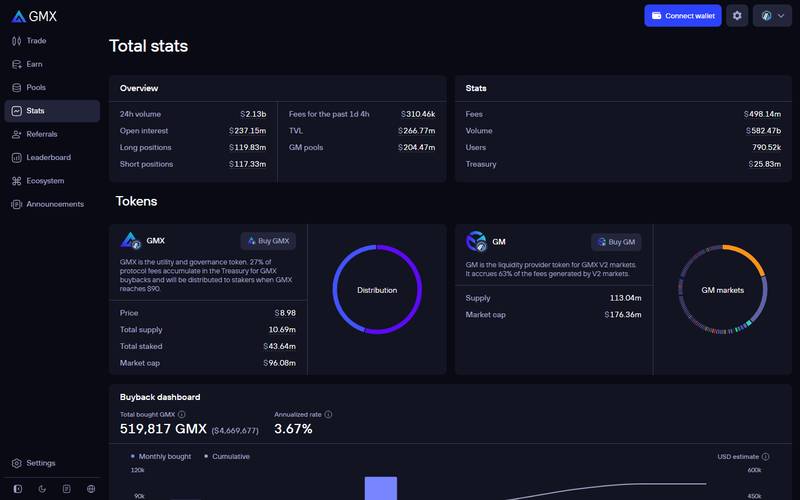
The Total stats page: volume, open interest, TVL, fees, users and treasury on one screen, plus a buyback dashboard at the bottom.
How GMX Looks on Your Device
On a Laptop or Desktop (1440px wide)
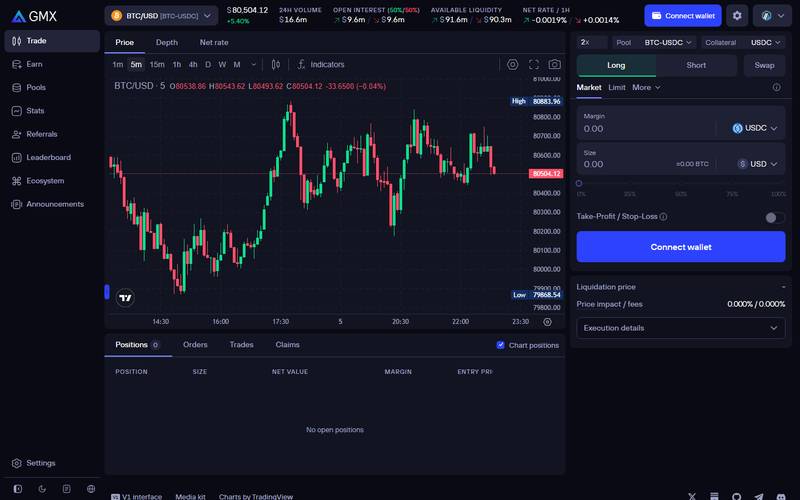
Left: the navigation menu (Trade, Earn, Pools, Stats, Referrals, Leaderboard, Ecosystem, Announcements). Centre: a TradingView chart for the selected market, with Price, Depth and Net rate tabs. Right: the order box. Top bar: 24h volume, open interest, available liquidity and the hourly net rate for the market.
Best for: serious trading. You see the chart, the order box, your positions and the fee preview at the same time.
On a Tablet (1024px wide)
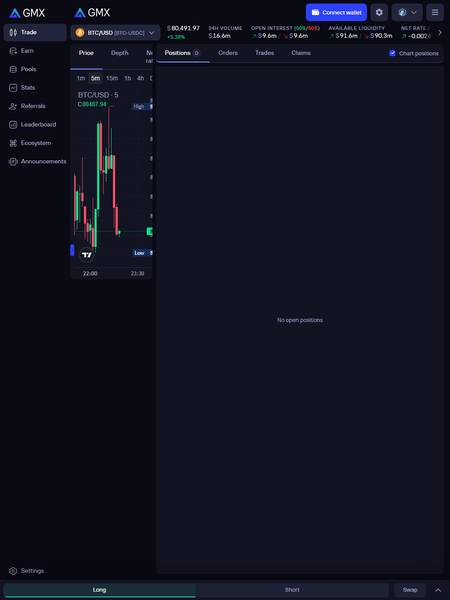
On tablet the chart shrinks into a narrow column next to the Positions panel, and the Long / Short / Swap buttons move to a bar at the bottom of the screen. The order box opens from that bar. The price, 24h volume, open interest, available liquidity and net rate stay in a strip at the top and scroll sideways.
Best for: monitoring open positions and adjusting stop-losses from the couch. The chart is cramped at this width, so use desktop for technical analysis.
On a Phone (430px wide)
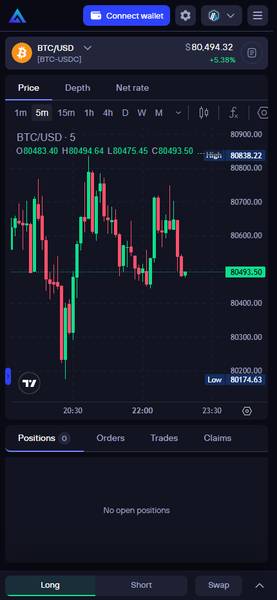
On phone the page becomes a single column: market selector and price on top, then the chart, then your positions. The Long / Short / Swap buttons are pinned to the bottom so you can reach them with one thumb.
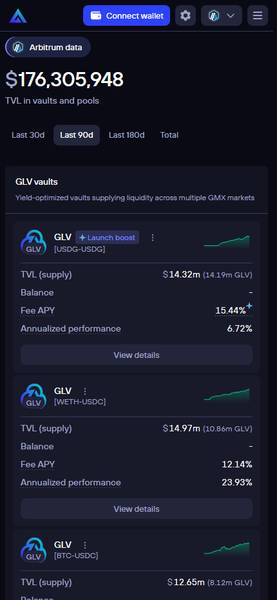
The Pools page also works on a phone, though long tables need sideways scrolling.
Bottom line on devices: no app is required. GMX is a website that adapts to the screen. Desktop is the most comfortable for trading; phone is fine for checking positions.
The Landing Page (gmx.io)
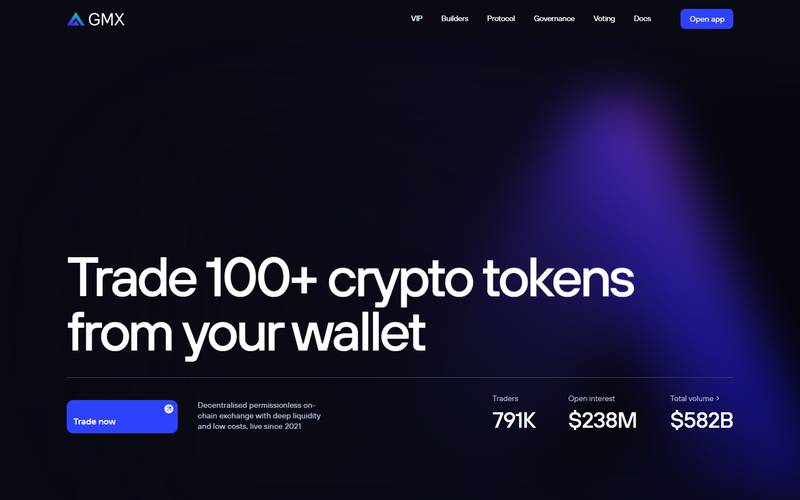
The marketing site at gmx.io. The headline reads "Trade 100+ crypto tokens from your wallet" and shows 791K traders, $238M open interest and $582B total volume. The "Open app" and "Trade now" buttons lead to app.gmx.io. Always check the address bar before connecting a wallet; fake GMX sites exist.
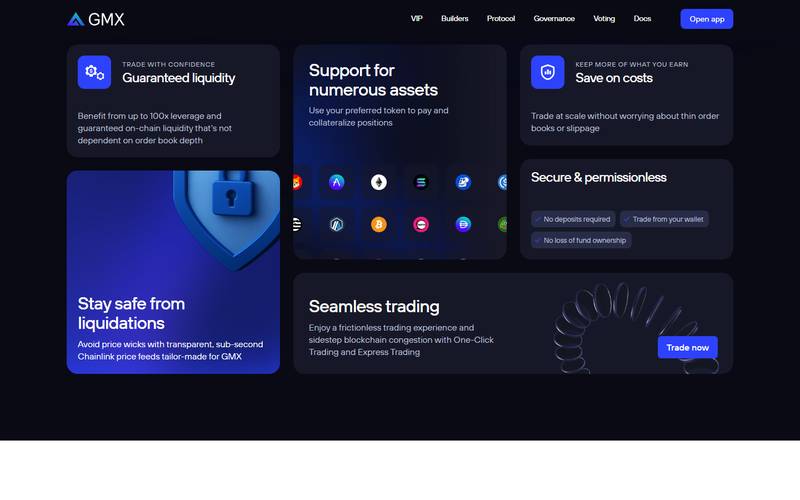
Scrolling down shows the feature cards: up to 100x leverage with on-chain liquidity, support for many assets as collateral, "No deposits required / Trade from your wallet / No loss of fund ownership", sub-second Chainlink price feeds against liquidations, and One-Click and Express Trading.
Core Features
1. Trade (perpetual futures)
The main screen. Pick a market, choose Long or Short, enter your margin (the money you put up) and size (the total position), then send the order.
Order types are tabs under Long/Short: Market (execute now), Limit (execute when price reaches your level) and More (additional order types such as trigger orders). A Take-Profit / Stop-Loss switch lets you attach exit levels when you open.
2. Markets: crypto plus gold, oil and more
Click the market name at the top left to open the market list.
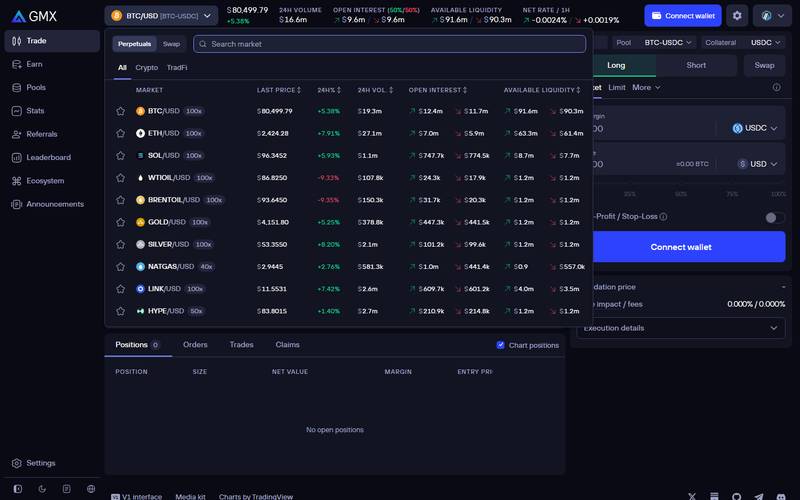
The market list on November 5, 2026, with price, 24h change, volume, open interest and available liquidity per market. Tabs: All, Crypto, TradFi. Switch to "Swap" at the top to see spot swap pairs.
Markets visible on the list at capture time, with the maximum leverage badge shown next to each:
| Market | Price | Max leverage | 24h change |
|---|---|---|---|
| BTC/USD | $80,499.79 | 100x | +5.38% |
| ETH/USD | $2,424.28 | 100x | +7.91% |
| SOL/USD | $96.3452 | 100x | +5.93% |
| WTIOIL/USD | $86.8250 | 100x | -9.33% |
| BRENTOIL/USD | $93.6450 | 100x | -9.35% |
| GOLD/USD | $4,151.80 | 100x | +5.25% |
| SILVER/USD | $53.3550 | 100x | +8.20% |
| NATGAS/USD | $2.9445 | 40x | +2.76% |
| LINK/USD | $11.5531 | 100x | +7.42% |
| HYPE/USD | $83.8015 | 50x | +1.40% |
The list scrolls further. The "TradFi" tab groups the commodity and index markets. Having gold and oil next to BTC in a wallet-based exchange is one of GMX's most unusual features.
Leverage warning: at 100x, a roughly 1% move against you can bring a position close to liquidation, depending on maintenance margin, fees and market conditions. Beginners should stay at 2x to 5x.
3. Earn: GMX, GLV and GM
The Earn page has four tabs: Portfolio, Discover, Additional opportunities and Distributions.
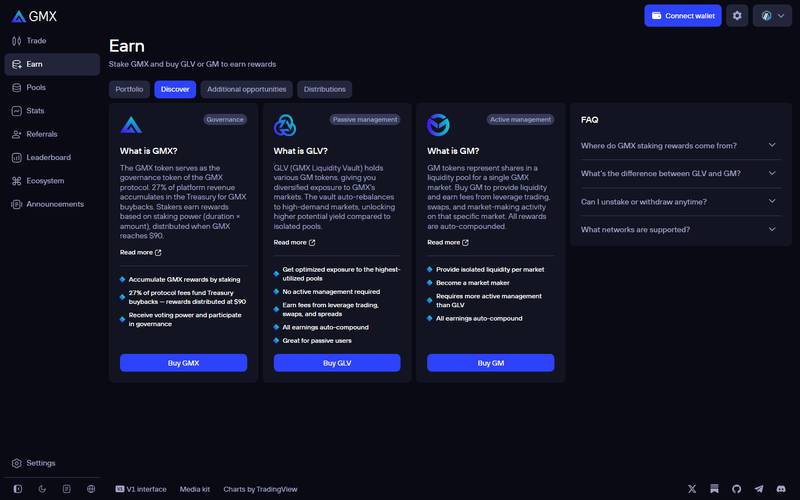
Discover tab. Three products: GMX (governance token), GLV (passive liquidity vault) and GM (single-market liquidity pool). The right-hand FAQ answers where staking rewards come from, GLV vs GM, withdrawals and supported networks.
| Product | What it is | Who it suits |
|---|---|---|
| GMX | Governance token. Staking gives rewards and voting power | Long-term holders |
| GLV | A vault holding several GM tokens and auto-rebalancing between them | Passive users |
| GM | Liquidity for one specific market (for example BTC/USD) | Active users who pick a market |
Important change from older guides: the live Earn page now says that 27% of protocol fees accumulate in the Treasury for GMX buybacks, and that the stakers' share from this pool is distributed when GMX reaches $90. Older articles describe GMX staking as paying a share of fees in ETH continuously. On November 5, 2026 GMX traded at about $8.98, so this distribution condition was not met. Check the Earn page and the Distributions tab for the current rule before you stake.
The Total stats page backs this up with a buyback dashboard: 519,817 GMX bought for about $4.67M, shown with an annualized rate of 3.67%.
4. Pools: GLV vaults and GM pools
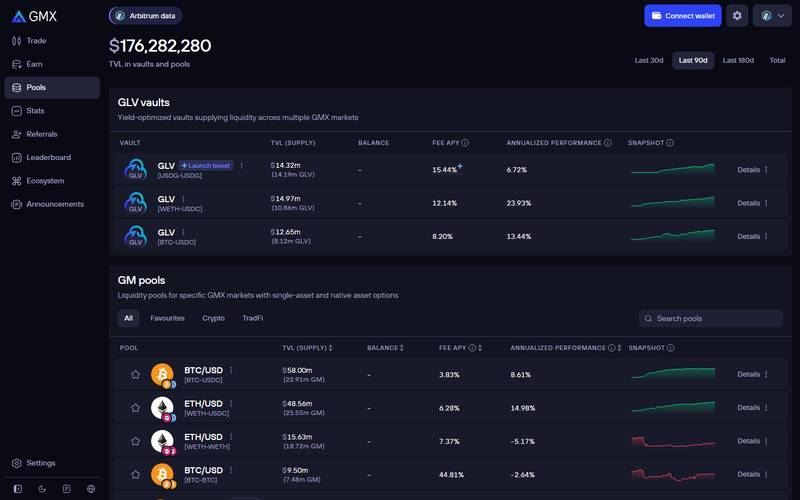
Pools page for Arbitrum. Headline: $176,282,280 TVL in vaults and pools (90-day view). GLV vaults at the top, GM pools below with filters All / Favourites / Crypto / TradFi and a search box.
Examples from the table at capture time (5 Nov 2026, Arbitrum, the page's default 90-day view). These are GMX's own interface figures. We did not recalculate them, and GMX does not show its formula on this page, so treat them as the platform's reported numbers over that window rather than a forecast:
| Pool | TVL (supply) | Fee APY | Annualized performance |
|---|---|---|---|
| GLV [USDC-USDG] (launch boost) | $14.32M | 15.44% | 6.72% |
| GLV [WETH-USDC] | $14.97M | 12.14% | 23.93% |
| GLV [BTC-USDC] | $12.65M | 8.20% | 13.44% |
| GM BTC/USD [BTC-USDC] | $58.00M | 3.83% | 8.61% |
| GM ETH/USD [WETH-USDC] | $48.56M | 6.28% | 14.98% |
| GM ETH/USD [WETH-WETH] | $15.63M | 7.37% | -5.17% |
| GM BTC/USD [BTC-BTC] | $9.50M | 44.81% | -2.64% |
How to read this:
- Fee APY is the income from fees only.
- Annualized performance also includes the change in value of the tokens in the pool and the pool's profit or loss against traders. It can be negative even when Fee APY is high. A pool made of volatile assets (for example BTC-BTC) can show a big Fee APY and still lose money.
- Use the Details link on a row to see the pool composition and the performance chart.
5. Stats and buyback dashboard
Covered above. Use it before depositing to see whether volume and open interest are healthy.
6. Referrals
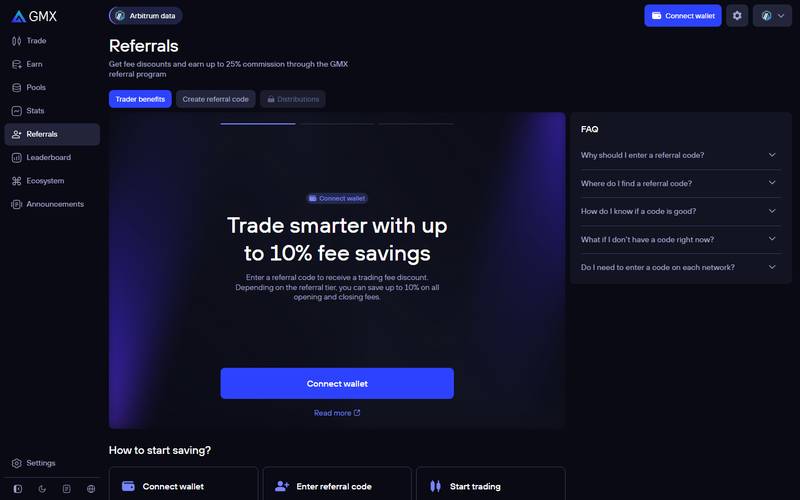
Referrals page, "Trader benefits" tab. The headline says traders can save up to 10% on opening and closing fees with a referral code, and the subtitle says affiliates can earn up to 25% commission. Tabs: Trader benefits, Create referral code, Distributions.
7. Leaderboard
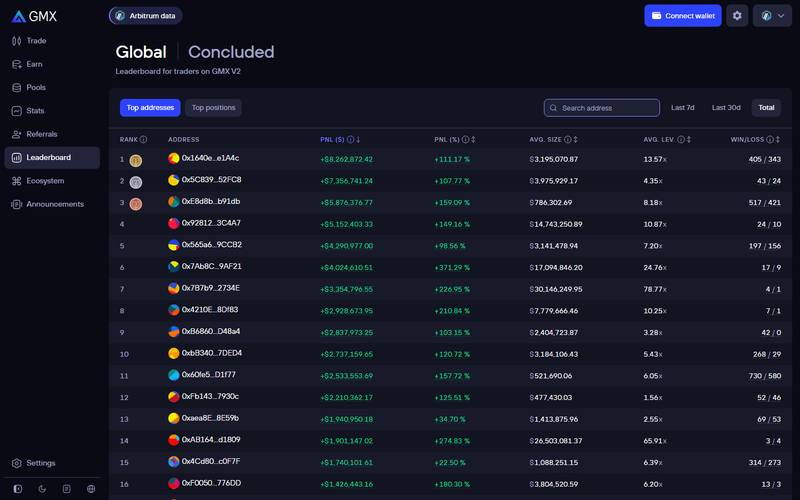
The leaderboard for traders on GMX V2. The header reads "Global | Concluded", so the competition was over at capture time. Tabs: Top addresses and Top positions, with filters Last 7d, Last 30d and Total. The Total view ranks wallets by profit: the top address shows about +$8.26M PnL (+111.17%) with a 405 / 343 win-loss record, and the second about +$7.36M. Average leverage in the top 16 ranges from 1.56x to 78.77x, which shows that results vary a lot and are not a recommendation.
Supported Networks
In the interface observed at capture time, the network selector listed Arbitrum, Avalanche, Solana and MegaETH. The Pools and Referrals pages show an "Arbitrum data" label so you know which network you are looking at.
Tip: The Referrals FAQ also asks "Do I need to enter a code on each network?" Check the answer there before assuming a code works everywhere.
Fees
| Fee | What it is |
|---|---|
| Position open / close fee | 0.04% of position size when your trade reduces the gap between long and short open interest, 0.06% when it widens it. Some TradFi and commodity markets use different rates (GMX fees docs, checked 6 Nov 2026) |
| Swap fee | 0.05% or 0.07% of the swap amount on standard pools, depending on whether the swap improves pool balance; lower on stablecoin pairs (same docs page) |
| Borrow fee | Charged per second on the larger side of open interest |
| Funding fee | Paid between longs and shorts; can be a cost or an income depending on your side |
| Price impact | Shown live in the order box ("Price impact / fees") |
| Execution fee | A small gas amount for the keeper that executes your order; unused part is refunded |
| Liquidation | If your margin falls too low, the position is closed and you lose it |
You do not need to calculate these by hand. The order box shows Price impact / fees and an Execution details panel before you confirm.
For liquidity providers, the Stats page says GM tokens accrue 63% of the fees generated by V2 markets.
How to Trade on GMX: Step-by-Step Tutorial
We captured Steps 1 to 5 from the live interface without connecting a wallet. Approving, signing, confirming and resulting order execution were not tested.
Step 1: Open the app
Go to app.gmx.io (or press the launch button on gmx.io).
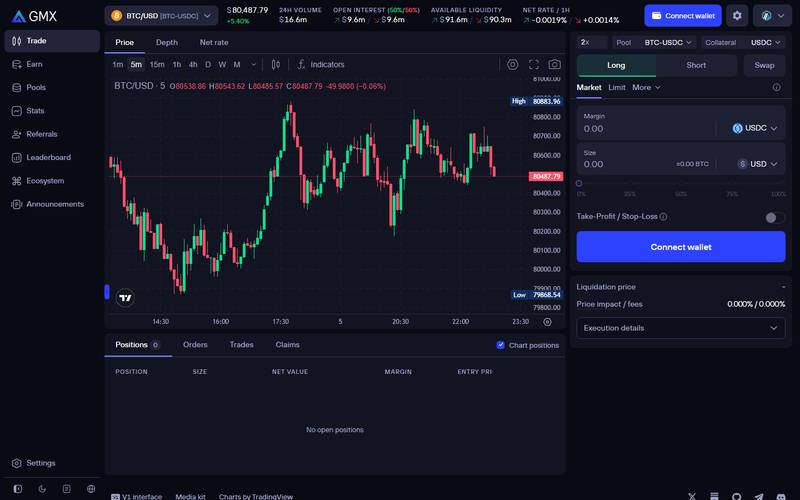
You can browse prices, charts and market data without a wallet. The blue "Connect wallet" button is in the top-right corner and again inside the order box.
Step 2: Connect a wallet
Click Connect wallet.
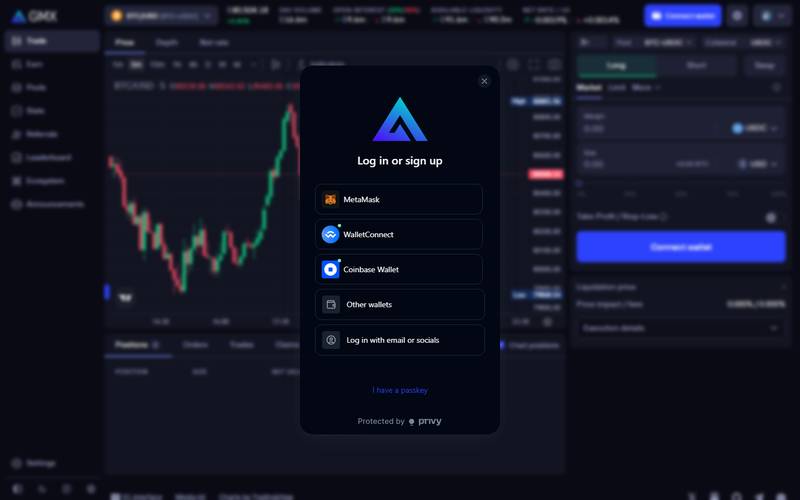
The login window ("Log in or sign up") lists MetaMask, WalletConnect, Coinbase Wallet, Other wallets and "Log in with email or socials". It is provided by Privy, and there is also an "I have a passkey" link.
What is a wallet? Think of it as a digital keychain. It holds your coins and signs transactions. The observed GMX wallet modal does not ask you to create a GMX password. For a first try, MetaMask or Coinbase Wallet are the most common choices. The email/social option is shown in the observed modal.
You will also need:
- Funds on the network you are using (for example USDC on Arbitrum)
- A small amount of the network's gas token (ETH on Arbitrum) for transaction fees
Step 3: Choose your market
Click the market name at the top left (the default is BTC/USD) and pick one from the list. See the market selector screenshot above.
Step 4: Pick Long or Short, and the order type
- Long if you think the price will rise, Short if you think it will fall
- Under it, choose Market to trade now or Limit to wait for a price
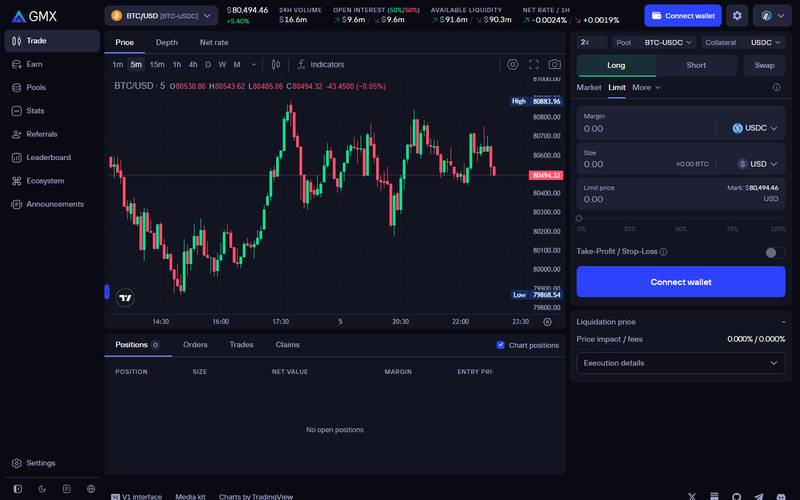
Limit tab selected. You set the trigger price and the order waits.
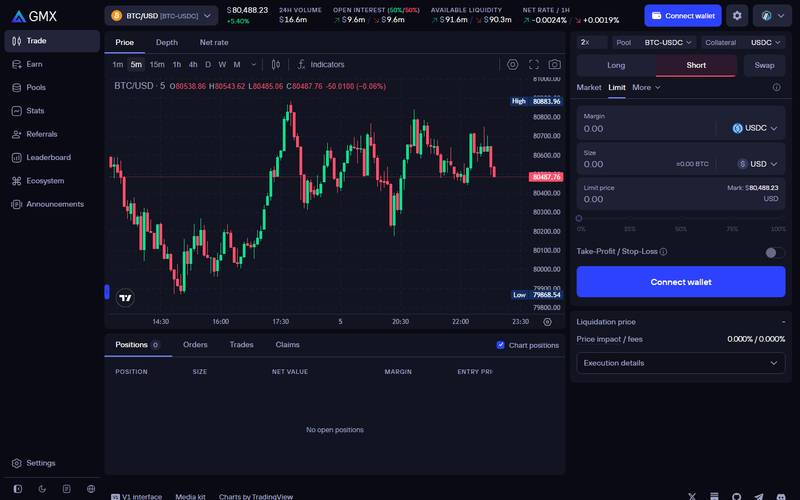
Short tab selected. The box otherwise looks identical, so double-check the side before confirming.
Step 5: Enter margin, size and leverage
- Margin: the collateral you deposit (USDC by default). The "Collateral" selector at the top lets you change it.
- Size: total position value. The slider under it goes from 0% to 100% of your balance.
- Leverage: the box at the top left of the order panel (default 2x). Higher leverage means a closer liquidation price.
- Optional: switch on Take-Profit / Stop-Loss to set exit levels now.
Before you confirm, read:
- Liquidation price: the price at which you lose your margin
- Price impact / fees: total cost of entering
- Execution details: keeper fee and other details
Step 6: Confirm and manage your position
The observed interface labels Positions, Orders, Trades and Claims tabs. Approving, signing, execution and any resulting position management or claims were not tested.
How to Provide Liquidity (GM or GLV)
Not captured with a wallet. Steps follow the Earn and Pools pages.
- Go to Earn and read the FAQ, or open Pools to see all vaults and pools.
- Choose GLV if you want one token that spreads risk across several markets, or GM if you want one specific market.
- Compare Fee APY and Annualized performance; avoid picking only by Fee APY.
- Press Buy GLV or Buy GM, choose the deposit asset and confirm in your wallet.
- Track the position under the Portfolio tab of Earn.
Risks for LPs: pools can lose money when traders are collectively profitable; the price of the pool's tokens can fall; smart contract risk always exists.
How to Use or Create a Referral Code
Based on the Referrals page; wallet actions not screenshotted.
As a trader (save on fees):
- Open Referrals > Trader benefits (the page opens with the headline "Trade smarter with up to 10% fee savings").
- Connect your wallet and enter a referral code.
- Trade as normal. The page says the discount can reach up to 10% of opening and closing fees, depending on the referral tier.
As an affiliate (earn commission):
- Open Create referral code.
- Register a code with your wallet.
- Share it. The page says commission can reach up to 25%, depending on tier. The observed page includes a Distributions tab.
Check before you share: tiers and percentages are set by GMX and can change. Read the Referrals FAQ ("Why should I enter a referral code?", "How do I know if a code is good?") before promoting a code.
Security: What You Need to Know
- Self-custody: you connect your own wallet; the observed wallet modal does not ask you to create a GMX password.
- Oracle risk: the observed landing page describes Chainlink price feeds; oracle-price risk remains a consideration.
- Liquidation risk: with leverage, you can lose your whole margin quickly.
- Smart contract risk: any DeFi contract can contain bugs.
- Phishing: use only gmx.io and app.gmx.io, and never share a seed phrase.
GMX vs Competitors
| GMX | Hyperliquid | Jupiter Perps | |
|---|---|---|---|
| Model | Oracle price + liquidity pools | Order book | Pool + oracle |
| Counterparty | GM / GLV pool | Other traders | JLP pool |
| Wallet needed | Yes | Yes | Yes |
| Max leverage seen | 100x (BTC, ETH, SOL, gold) | See our Hyperliquid review | See Jupiter docs |
| Special markets | Gold, silver, oil, natural gas | Large range of perps | Solana-focused |
| Passive earning | GM / GLV pools | Vaults | JLP |
For the full numbers on Hyperliquid see our dedicated Hyperliquid review.
Pros and Cons
Pros
- No sign-up: you can look around the interface, charts and stats without a wallet
- Oracle pricing with no order-book queue
- Gold, silver, oil and gas markets in a crypto wallet
- Passive options (GLV) for people who do not want to trade
- Clear stats page with open interest, TVL and buyback data
Cons
- Interface is built for DeFi users; terms like margin, price impact, keepers and GM vs GLV take time to learn
- Fees are charged on opening and closing, so very frequent trading adds up
- GMX staking rewards now depend on the token reaching $90, which is far from the $8.98 price on the capture date
- Fee APY on some pools looks attractive but can be offset by negative performance
- Leverage up to 100x is dangerous for beginners
Verdict
Rating: 7.5 / 10
GMX is a mature and transparent perp DEX with an unusual product: oracle-priced futures on both crypto and commodities, funded by ordinary users' liquidity. The interface is clean and fast on all three screen sizes, the stats are public and the earn options are explained on the page. The main weaknesses are a learning curve and the change in how GMX staking is rewarded.
- Choose GMX if you want to trade BTC, ETH or commodities from your own wallet at moderate leverage, or you want to earn fees as an LP and understand the risks.
- Look elsewhere if you want the lowest fees for very frequent trading or you want a simple app with no concepts to learn.
Quick Links
| Website | gmx.io |
| App | app.gmx.io |
| Docs | docs.gmx.io |
| DeFiLlama | defillama.com/protocol/gmx |
Review updated November 5, 2026. Not financial advice.
Editorial credits
Checked by AiCryptoCore QC Team before publishing on November 6, 2026 for headline accuracy, original value, factual consistency, metadata, authorship claims, review evidence and risk disclosure: our AI review system checks every article before it goes live, and our duty editor monitors it after publication.
AiCryptoCore uses AI for research, drafting and review. Our editorial team is responsible for every article and corrects or withdraws articles when needed. How we review.